
AI Image Upscaler and Enhancer

Increase resolution and recover useful detail in photos, AI-generated art, storyboard frames, and production assets. Choose 2x or 4x, compare three models, and inspect the result before export.
Source Image
Upload an image to upscale
Drag & drop or click to browse. JPG, PNG, WebP
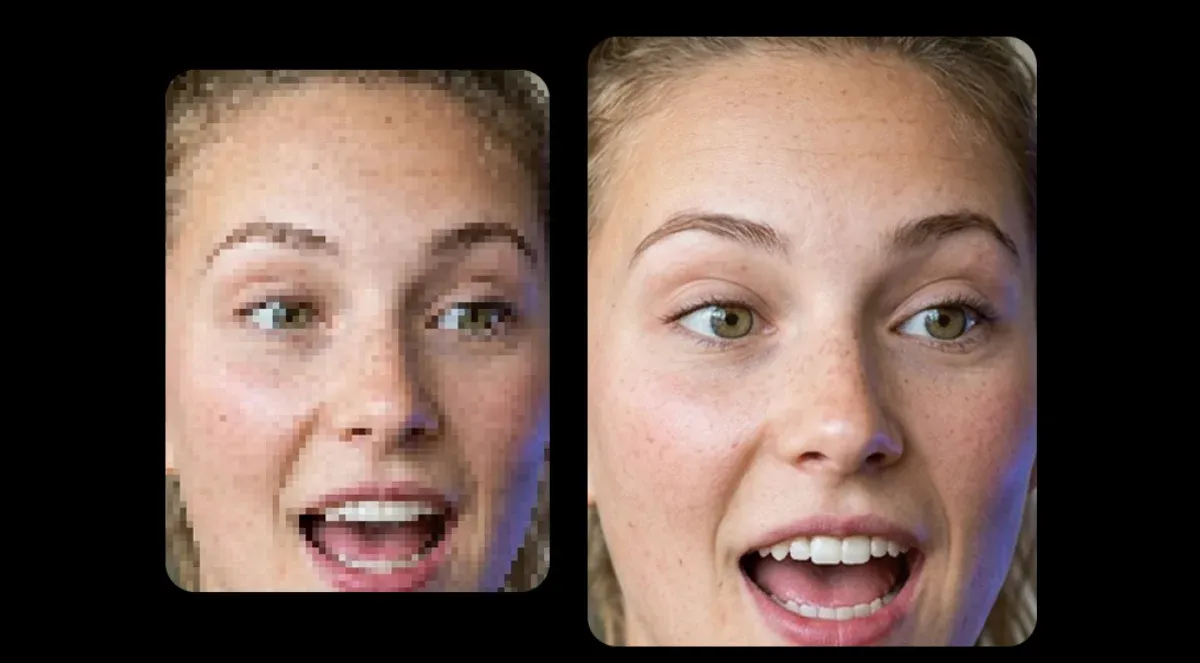
Inspect recovered detail
Drag to compare the same portrait crop
How to upscale images with AI
Upload your image
Drop any image: photo, AI-generated art, screenshot, illustration, or storyboard frame. Supports JPG, PNG, and WebP formats. The AI handles any source resolution.
Choose upscale factor
Select 2x for double resolution or 4x for quadruple. The AI analyzes the image, predicts missing detail, and rebuilds textures, edges, and fine details at the target resolution.
Download your upscaled image
Your upscaled image is ready in seconds. Download the high-resolution result as PNG or use it directly in your creative project. Works seamlessly with storyboards, video generation, and print production.
Resolution plus restoration
Why choose this AI image upscaler
Upscaling and enhancement are one workflow here. The selected model increases resolution while reconstructing plausible texture, edges, and facial detail for the source type.
- True Detail Recovery
- The model does more than interpolate pixels. It predicts plausible texture and edge detail at the target resolution. Inspect small text and identity-critical features because generated detail can differ from the source.
- Built for AI-Generated Art
- Most upscalers are trained on photos. Melies handles AI-generated images, concept art, and illustrations without introducing the artifacts common when upscaling synthetic content.
- 2x and 4x Scaling
- Double or quadruple your image resolution. Take a 1024px AI-generated image to 2048px or 4096px. Output is sharp enough for print, large displays, and production use.
- One Image at a Time
- Process and compare one source image at a time. Each completed upscale is saved to your Melies asset library for use in later shots and projects.
- No Watermarks
- Every upscaled image is clean. No watermarks, no branding, no restrictions. Download and use immediately in any professional context.
- Pipeline Integration
- Upscaled images feed directly into your Melies project. Upscale a storyboard frame, then send it to image-to-video. Enhance a character portrait, then use it as a reference. One platform, connected workflow.
AI upscaling models available on Melies
Choose from multiple AI upscaling engines, each optimized for different content types and quality levels.
 Real-ESRGAN
Fast, great for most images. Industry-standard super-resolution model that excels at general-purpose upscaling with sharp, clean results.
AI image upscaling use cases
From AI art to old photos, the AI image upscaler improves any image for any use case.
- 01AI-Generated ArtUpscale AI-generated images from 1024px to print-ready 4K+. Preserve the style and detail of FLUX, Stable Diffusion, and Midjourney outputs while adding the resolution needed for production use.
- 02Low-Res PhotosIncrease the resolution of old photos and smartphone shots. The AI predicts and generates detail that wasn't in the original. Small images become print-ready at 2x or 4x their original size.
- 03Storyboard FramesUpscale rough storyboard sketches and concept frames for client presentations. Go from quick AI thumbnails to presentation-quality images without regenerating.
- 04E-commerce & ProductEnhance product photos for high-resolution listings, print catalogs, and banner ads. Get clean, sharp images at any size without reshooting.
- 05Print & Large FormatPrepare images for posters, gallery prints, and large-format displays. AI upscaling gives you the resolution needed for physical media without visible artifacts.
- 06Video ThumbnailsUpscale thumbnails, social media graphics, and cover images. Small source images become crisp, detailed assets ready for any platform or resolution.
How AI image upscaling works
Traditional image resizing uses interpolation, which averages nearby pixels to fill in gaps. The result is a larger image that looks blurry and lacks detail. AI upscaling takes a fundamentally different approach.
AI upscalers use deep neural networks trained on millions of image pairs at different resolutions. The model learns the relationship between low-resolution and high-resolution versions of the same image. When you upload a photo, the AI predicts what the missing high-resolution detail should look like and generates it.
This is called super-resolution. The AI reconstructs textures, sharpens edges, recovers facial features, and adds fine detail that never existed in the original file. The result is an image that looks naturally sharp at the higher resolution, not just stretched.
Upscale and enhance in one pass
Choose the scale and restoration model that fit the source. Compare the result at detail level before moving it into your production workflow.
AI image upscaler: frequently asked questions
Practical answers before you start creating.
More AI tools on Melies
AI Background Remover
Remove backgrounds from images instantly with AI.
AI Video Upscaler
Upscale video resolution to 4K with AI enhancement.
AI Image Generator
Generate images from text prompts with FLUX, Stable Diffusion, and more.
AI Thumbnail Maker
Create eye-catching thumbnails for YouTube and social media.
AI Video Generator
Generate videos from images and text with AI models.
Upscale your images to 4K+
Upload any image, choose your scale factor, and enhance. Sharp, detailed results in seconds. No software to install.
Choose a plan to generate and export