AI Video Generator
Generate professional AI videos from text descriptions or still images. Choose from leading video models, apply cinematic camera movements, and maintain character consistency. All in one tool built for filmmakers and creators.
See the motion before you choose a model
Watch how each shot moves, then write a new one in the tool above.
03 06
The visual proof stays close to the workflow
Start from text or a still, carry a character reference, and use camera language for the shot.
01
Carry a character across shots
Use real actor references to anchor identity before the model invents motion.
02
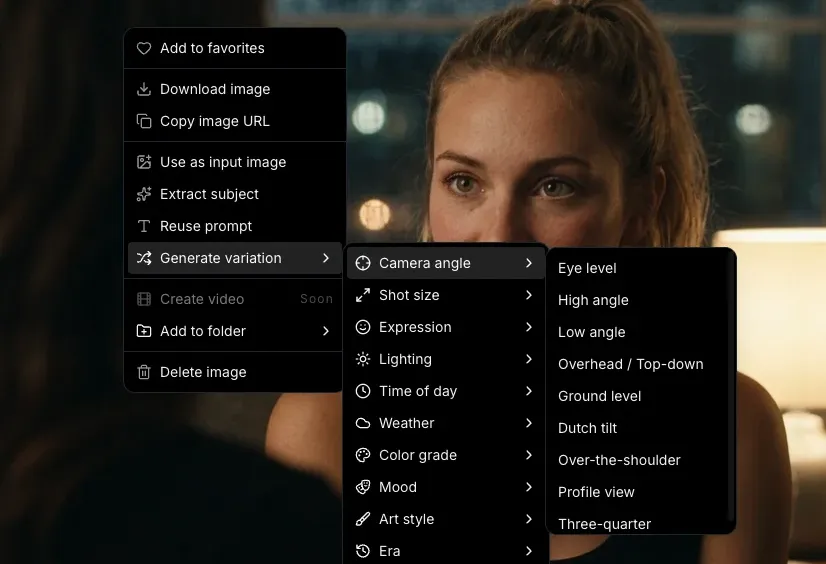
Choose a move by feel
Preview camera language and write the shot brief with a real filmmaker vocabulary.
03
Keep the look coherent
Apply lighting and visual style references while the image remains the anchor for motion.
04
Review motion before the timeline
Use short clips as previz, then move the usable shot into the rest of your Melies workflow.
From shot brief to a ready draft
Model settings and credit cost stay visible before you generate.
Describe your scene or upload an image
Type a text prompt describing the video you want: subject, action, mood, camera movement. Or upload a still image and let the AI animate it. Both workflows produce cinematic results.
Choose your AI model and settings
Pick from Kling, Veo, Sora, Wan, and more. Each model has a distinct motion style. Set your aspect ratio, duration, and camera movement preset. Compare outputs across models to find the best fit.
Generate, extend, and compose
Your video generates in seconds. Extend the clip, chain it with other shots, add a voice-over or soundtrack, and build a full sequence in the timeline editor. No switching tools.
Pick the model for this shot
Compare available models and choose the fit for your motion.
 Seedance 2.5ByteDance
 MiniMax H3 MaxMiniMaxMiniMax H3 Max TurboMiniMaxMiniMax H3MiniMax
 WAN 3.0 PrimeAlibabaSeedance 2.0ByteDance
 Grok Imagine Video 1.5xAI
 FLUX.3 VideoBlack Forest Labs
AI video generation, with the constraints visible
Learn how text, stills, duration, resolution, audio, and motion limits work.
What is an AI video generator?
An AI video generator is a tool that creates video content from text descriptions or images using artificial intelligence. You write a prompt describing the scene (or upload an image), and the AI generates a video clip with realistic motion, lighting, and camera work. Modern AI video generators produce clips that rival professionally shot footage.
Is this AI video generator free?
You can create a Melies account and explore the video generator. Generating videos requires credits from a paid plan. Plans differ in monthly credits and in how many generations can run at once. Each video shows its credit cost before you generate, and plan prices are on the pricing page.
What is the best AI video generator in 2026?
The best AI video generator depends on your use case. Kling v3 Pro is a strong choice for realistic motion. Google Veo 3.1 excels at cinematic depth and lighting. Sora 2 Pro is strong for creative storytelling. Seedance 2.5 handles long clips of up to 30 seconds with generated audio. Melies gives you all of these in one tool, so you can compare them and choose the best model for each shot.
Can I generate videos from text prompts?
Yes. Text-to-video lets you describe a scene in words (subject, action, setting, camera movement, lighting) and the AI generates a matching video clip. For example: 'A woman walks through a rain-soaked Tokyo street at night, slow dolly forward, neon reflections.' The more specific your prompt, the better the result.
Can I generate videos from images?
Yes. Image-to-video lets you upload a still image (a photo, AI-generated image, illustration, or screenshot) and the AI animates it into a video clip. You control the motion with a text prompt or by selecting a camera movement preset.
Which AI video models are available?
Melies offers more than 20 video models, including Seedance 2.5, Seedance 2.0, Kling v3 Pro, Kling O3 Pro, Veo 3.1, Veo 3.1 Lite, Sora 2 Pro, WAN 3.0 Prime, MiniMax H3, Luma Ray 3.2, LTX 2.5, PixVerse V6, and Vidu Q3. The table on this page lists every model with its clip length, resolution, audio support, and starting credits.
How long are AI-generated videos?
Generated clips are typically 3 to 10 seconds long depending on the model. You can extend any clip by generating a continuation from the final frame, chain multiple clips together on the timeline, and build full sequences of any length.
What resolution do AI videos generate at?
Most models generate at 720p or 1080p. Some go higher: Veo 3.1 and the Kling 4K models offer 4K, and LTX 2.3 offers 2160p. The table on this page lists the resolutions each model supports.
Every video model on Melies, with credit costs
Text-to-video runs on the models below. The list, clip lengths, resolutions, audio support, and starting credits come from the same catalog the app uses to charge credits.
- Models available
- 25 video models
- Clip length
- 3 to 30 seconds, depending on the model
- Highest resolution
- 4K
- Generated audio
- Available on 21 of 25 models
- Starting cost
- From 25 credits per clip
- Plan prices
- See plans and monthly credits
| Model | Maker | Clip length | Resolution | Audio | From |
|---|---|---|---|---|---|
| MiniMax H3 Max Turbo | MiniMax | 5 to 15 s | 480p, 768p, 1080p | Yes | 25 credits |
 PixVerse V6 | PixVerse | 5 to 10 s | 540p, 720p, 1080p | Yes | 42 credits |
 LTX 2.3 | Lightricks | 6 to 10 s | 1080p, 1440p, 2160p | Yes | 50 credits |
| MiniMax H3 Max | MiniMax | 5 to 15 s | 480p, 768p | No | 50 credits |
 Vidu Q3 | Vidu | 5 to 10 s | 540p, 720p, 1080p | Yes | 50 credits |
 Kling v3 Standard | Kling | 5 to 10 s | Model default | Yes | 60 credits |
 Veo 3.1 Lite | 4 to 8 s | 720p, 1080p | Yes | 60 credits | |
| WAN 3.0 Prime | Alibaba | 5 to 30 s | 480p, 720p, 1080p | Yes | 70 credits |
| WAN v2.7 | Alibaba | 5 to 15 s | 720p, 1080p | Yes | 70 credits |
| Grok Imagine Video 1.5 | xAI | 6 to 15 s | 480p, 720p, 1080p | Yes | 75 credits |
| Kling O3 Standard | Kling | 5 to 10 s | Model default | Yes | 80 credits |
 HappyHorse 1.0 | HappyHorse | 5 to 15 s | 720p, 1080p | No | 100 credits |
| Kling O3 Pro | Kling | 5 to 10 s | Model default | Yes | 100 credits |
| Kling v3 Pro | Kling | 5 to 10 s | Model default | Yes | 100 credits |
| Seedance 2.0 Fast | ByteDance | 5 to 15 s | 480p, 720p | Yes | 100 credits |
| Seedance 2.5 | ByteDance | 4 to 30 s | 480p, 720p | Yes | 100 credits |
 Luma Ray 3.2 | Luma | 5 to 10 s | 540p, 720p, 1080p | No | 101 credits |
| MiniMax H3 | MiniMax | 5 to 15 s | 768p, 2K | No | 124 credits |
| Seedance 2.0 | ByteDance | 5 to 15 s | 480p, 720p | Yes | 125 credits |
| LTX 2.5 | Lightricks | 6 to 10 s | 720p, 1080p | Yes | 144 credits |
| FLUX.3 Video | Black Forest Labs | 5 to 20 s | 720p, 1080p | Yes | 170 credits |
| Kling O3 4K | Kling | 3 to 15 s | 4K | Yes | 180 credits |
| Kling V3 4K | Kling | 3 to 15 s | 4K | Yes | 180 credits |
 Sora 2 Pro | OpenAI | 4 to 12 s | 720p, 1080p | Yes | 200 credits |
| Veo 3.1 | 4 to 8 s | 720p, 1080p, 4K | Yes | 400 credits |
Credit costs come from the price table Melies uses when you generate. The final cost depends on clip length, resolution, and audio, and the tool shows it before you confirm. Plan prices and monthly credits are on the pricing page. Last reviewed November 13, 2026.
Keep the shot brief. Move into the timeline.
Your prompt and settings are kept when you create an account.